비행기 안에서도 빠른 인터넷을 쓰는 시대
스타링크는 스페이스X가 운영하는 저궤도 위성 인터넷 서비스다. 지상에서 약 550km 떨어진 궤도에 위성을 배치해 기존 정지궤도 위성보다 신호가 이동하는 거리를 크게 줄인 것이 특징이다.
그렇다고 9월부터 모든 항공편에서 곧바로 같은 서비스를 이용할 수 있는 것은 아니다. 항공기마다 별도의 장비 설치와 시험이 필요하기 때문에 스타링크가 장착된 일부 기재부터 순차적으로 서비스가 시작된다.
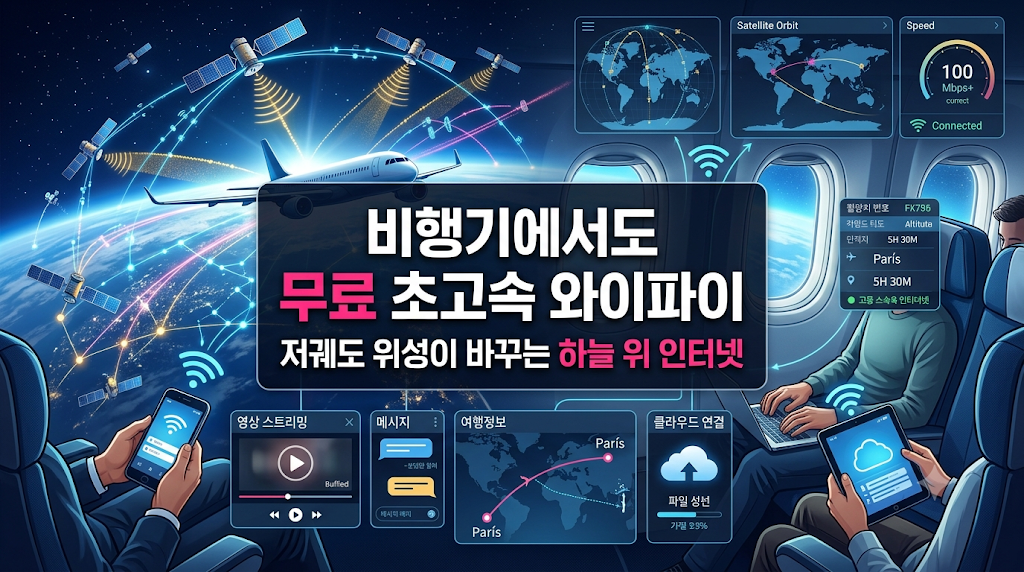
기존 기내 와이파이와 무엇이 다를까
기존 위성 인터넷은 지상 약 35,786km 상공의 정지궤도 위성을 이용하는 경우가 많았다. 넓은 지역을 담당할 수 있지만 신호의 이동 거리가 길어 지연시간이 커질 수 있다.
스타링크는 약 550km 고도의 저궤도 위성망을 이용한다. 통신 거리가 짧아져 기존 정지궤도 방식보다 빠른 반응과 높은 데이터 처리 성능을 기대할 수 있다.
빠르게 이동하는 항공기는 이용 가능한 위성을 계속 추적하며 연결을 넘겨받는다. 이 과정에서 위성망, 지상망과 항공기 안테나가 함께 작동한다.
스타링크 기내 인터넷으로 가능한 일
영상과 음악 스트리밍
네트워크 상태가 안정적이라면 개인 스마트폰이나 태블릿으로 영상과 음악 스트리밍 서비스를 이용할 수 있다. 탑승 전에 모든 콘텐츠를 내려받아야 했던 불편도 줄어들 수 있다.
메신저와 업무 서비스
메일과 메신저를 확인하고 클라우드 문서를 열어보는 일이 한층 수월해진다. 연결 상태와 회사 보안정책이 허용한다면 화상회의를 비롯한 일부 실시간 업무도 가능해질 수 있다.
도착 전 여행 준비
비행 중에도 도착지 날씨와 교통편을 확인하고 숙소나 일정을 점검할 수 있다. 항공편 변경이나 도착 이후의 동선을 미리 확인하는 데도 활용할 수 있다.
대한항공과 아시아나항공의 도입 계획
| 구분 | 초기 적용 방향 | 확인할 부분 |
|---|---|---|
| 대한항공 | B777-300ER과 A350-900 등 주요 장거리 기재를 중심으로 순차 도입 | 항공편에 실제 투입되는 기재와 장비 설치 여부 |
| 아시아나항공 | 스타링크가 장착된 일부 A350 기재부터 서비스 준비 | 서비스 개시일과 대상 항공편의 변경 가능성 |
| 그룹 LCC | 진에어, 에어부산과 에어서울에도 단계적으로 확대할 계획 | 항공사별 기종과 개조 일정의 차이 |
| 이용요금 | 장착 항공기에서는 좌석 등급과 관계없이 무료 제공하는 방향 | 최종 이용 조건과 별도의 로그인 절차 |
최대 500Mbps는 어떤 의미일까
관련 보도에서는 스타링크 항공용 서비스가 최대 500Mbps 수준의 데이터 전송을 지원하는 것으로 소개됐다. 다만 이는 특정 조건에서 가능한 최대 성능으로, 모든 승객에게 각각 제공되는 보장 속도를 의미하지 않는다.
실제 속도와 지연시간은 항공기의 위치, 위성 및 지상국 연결 경로, 기상 조건과 동시 접속 인원에 따라 달라질 수 있다. 한 항공편에서 많은 승객이 동시에 고화질 영상을 재생한다면 체감 속도가 낮아질 가능성도 있다.
쉽게 이해하는 핵심 구분
최대 속도는 기술적으로 도달할 수 있는 상한을 소개한 숫자다.
실제 속도는 탑승한 항공편의 위치와 네트워크 상황에 따라 달라진다.
개별 이용 속도는 같은 항공기의 승객들이 대역폭을 함께 사용하는 방식과 운영 정책의 영향을 받을 수 있다.
무료 서비스라도 모든 항공편이 대상은 아니다
가장 쉽게 생길 수 있는 오해는 항공사 이름만 같으면 모든 항공편에서 스타링크를 이용할 수 있다고 생각하는 것이다. 초기에는 장비가 설치된 일부 항공기로 대상이 제한된다.
예약 화면에 표시된 기종과 실제 운항 기종이 달라지는 경우도 있다. 스타링크 이용이 꼭 필요하다면 출발에 가까운 시점에 항공사 홈페이지와 예약 정보를 다시 확인하는 편이 안전하다.
전 기단 확대 계획도 모든 항공기의 설치가 동시에 끝난다는 뜻은 아니다. 정비 일정과 항공기별 인증 절차에 따라 서비스 가능 항공기가 단계적으로 늘어나는 과정으로 이해하는 것이 정확하다.
이용 전에 알아둘 보안과 사용 습관
기내 와이파이는 호텔이나 카페의 인터넷과 마찬가지로 여러 이용자가 함께 접속하는 네트워크다. 항공사는 승객용 인터넷과 항공기 운항 관련 시스템을 엄격하게 분리하지만, 승객 개인도 공용 네트워크에 맞는 기본적인 보안 습관을 지킬 필요가 있다.
운항 관련 설비의 보안과 승객 개인 기기의 보안은 서로 다른 문제다. 이용자는 소프트웨어를 최신 상태로 유지하고, 출처를 알 수 없는 파일이나 링크를 열지 않는 기본적인 주의를 기울이는 것이 좋다.
핵심 3줄 요약
- 첫째. 스타링크는 약 550km 고도의 저궤도 위성을 이용해 기존 정지궤도 방식보다 낮은 지연시간을 기대할 수 있는 인터넷 서비스다.
- 둘째. 대한항공과 아시아나항공의 무료 서비스는 스타링크가 설치된 일부 항공기부터 순차적으로 시작된다.
- 셋째. 최대 속도는 실제 이용 속도를 보장하는 숫자가 아니므로 적용 기재와 이용 조건을 함께 확인해야 한다.
탑승 전에 확인할 세 가지
기내 와이파이 이용 확인표
- 적용 기재: 예약한 항공편에 스타링크 장비가 설치된 항공기가 투입되는지 확인한다.
- 이용 조건: 무료 제공 범위, 접속 절차와 지원되는 서비스에 관한 최신 안내를 살펴본다.
- 기기 준비: 필요한 콘텐츠는 미리 저장하고 기기 업데이트와 보안 설정도 출발 전에 점검한다.
무료 기내 와이파이가 바꿀 여행 경험
기내 인터넷이 안정적으로 제공되면 비행시간은 외부와 단절된 시간이 아니라 여행을 준비하거나 콘텐츠를 즐길 수 있는 시간으로 바뀐다. 장거리 비행에서 그 차이는 더욱 크게 느껴질 수 있다.
항공사 입장에서도 연결 품질은 좌석과 식사처럼 승객이 직접 체감하는 서비스 요소가 된다. 어느 항공사가 더 높은 최대 속도를 제시하는가보다 실제 운항에서 얼마나 안정적인 환경을 제공하는지가 중요한 평가 기준이 될 가능성이 크다.
기내 무료 와이파이 시대의 핵심은 화려한 속도 숫자보다 내가 탈 항공편에서 실제로 안정적인 연결을 이용할 수 있느냐에 있다.
A New Era of Faster Internet in the Sky
Starlink is a low Earth orbit satellite internet service operated by SpaceX. Its satellites operate much closer to Earth than traditional geostationary satellites, shortening the distance that communications signals must travel.
This does not mean that every flight will provide the same service immediately. Each aircraft requires equipment installation and testing, so availability will expand progressively across equipped aircraft.
How Is Starlink Different From Traditional In-Flight Wi-Fi?
Traditional satellite systems often use satellites operating about 35,786 kilometres above Earth. They provide wide coverage but can create substantial latency because of the long signal path.
Starlink uses satellites operating at altitudes around 550 kilometres. The shorter distance can support lower latency and greater data capacity than traditional geostationary systems.
Aircraft move quickly, so onboard equipment must track available satellites and transfer connections between them. Satellites, ground networks and aircraft antennas all contribute to the service.
What Can Passengers Do With the Service?
Stream Video and Music
When network conditions allow, passengers may stream video and music on their own phones or tablets. This can reduce the need to download every piece of entertainment before boarding.
Use Messaging and Work Services
Email, messaging and cloud documents may become easier to access. Video meetings and other real-time services may also be possible when connection quality and workplace security policies permit.
Prepare Before Arrival
Passengers may check destination weather, transportation, accommodation and itinerary information before landing. The connection can also help with schedule changes and arrival planning.
The Korean Air and Asiana Rollout
| Category | Initial Direction | What to Check |
|---|---|---|
| Korean Air | Progressive introduction on aircraft including the Boeing 777-300ER and Airbus A350-900 | The aircraft assigned to the booked flight |
| Asiana Airlines | Service preparation beginning with selected Starlink-equipped A350 aircraft | The final launch date and eligible flights |
| Group LCCs | Planned expansion to Jin Air, Air Busan and Air Seoul | Different fleet and installation schedules |
| Passenger Charge | Free service regardless of cabin class on equipped aircraft | Final usage terms and login requirements |
What Does Up to 500 Mbps Mean?
Reports have described Starlink Aviation as supporting data speeds of up to 500 Mbps. This is a maximum figure under particular conditions, not a guaranteed individual speed for every passenger.
Actual speed and latency can vary with aircraft location, satellite and ground-station routing, weather and concurrent demand. Performance may decline when many passengers use high-bandwidth services at the same time.
Three Important Definitions
Maximum speed describes the upper level that the technology may support.
Actual speed varies according to the network conditions on a particular flight.
Individual experience can also depend on shared capacity and the airline’s operating policies.
Free Does Not Mean Available on Every Flight
A common misunderstanding is that every flight operated by the airline will immediately offer Starlink. Initial availability is limited to aircraft on which the necessary equipment has been installed.
The scheduled aircraft type may also change before departure. Passengers who consider connectivity essential should check the airline’s latest information closer to the travel date.
Security and Responsible Use
In-flight Wi-Fi is a shared network environment similar to internet access in a hotel or café. Airlines separate passenger connectivity from aircraft operational systems, while passengers should still follow basic security practices for their own devices.
Keeping software updated and avoiding unknown files or suspicious links remain sensible precautions when using a public network.
Three-Line Summary
- First. Starlink uses low Earth orbit satellites operating around 550 kilometres above Earth.
- Second. Free service at Korean Air and Asiana will expand progressively across equipped aircraft.
- Third. Maximum speed does not guarantee the actual experience on every flight.
Three Things to Check Before Boarding
In-Flight Wi-Fi Checklist
- Equipped aircraft: Check whether the aircraft assigned to the flight has Starlink installed.
- Usage terms: Review the latest information about free access, login procedures and supported services.
- Device preparation: Save essential content in advance and review device updates and security settings.
How Free In-Flight Wi-Fi May Change Travel
Reliable connectivity can turn flight time into an opportunity to prepare for arrival, communicate or enjoy a wider range of entertainment. The difference may be especially noticeable on long-haul flights.
Connectivity quality may also become a visible part of airline service. Consistent performance in real operations will matter more than the largest advertised speed figure.
The practical question is not simply whether Wi-Fi is free, but whether it is available and reliable on the flight a passenger actually takes.
출처 및 참고자료 / Sources and References
- 매일경제, 대한항공 스타링크 기반 무료 기내 와이파이 도입 보도: 2026년 9월 초 목표와 초기 적용 기종 참고. 대한항공 기내 와이파이 전면 무료 보도
- 머니투데이, 대한항공의 무료 제공 방침과 장거리 기재 중심의 순차 도입 계획 참고. 대한항공 스타링크 무료 제공 계획
- 뉴스토마토, 아시아나항공 일부 A350 기재의 장비 설치와 서비스 준비 관련 보도 참고. 아시아나항공 스타링크 도입 보도
- Seoul Economic Daily, Korean Air와 Asiana의 스타링크 설치 및 그룹 항공사 확대 계획 참고. Korean Air and Asiana Starlink Rollout
- Ullah et al., A First Look at Starlink In-Flight Performance: 실제 기내 성능과 지연시간 변동 요인 참고. Starlink In-Flight Performance Study
- Starlink, Improving Starlink’s Latency: 저궤도 위성 인터넷의 지연시간 구성 요소 참고. Starlink Latency Technicㄷal Note
면책조항 / Disclaimer
This article is an informational guide based on publicly available airline reports and technical materials about low Earth orbit in-flight connectivity. Actual launch dates, aircraft coverage, routes, speeds, login procedures and free-service availability may change according to testing, regulatory approval, installation schedules and operating conditions. Advertised maximum speeds do not represent guaranteed performance for every flight or passenger. Travellers should check the airline’s latest information before booking or departure.
[이데아 심층 분석] 고환율 이후 변동성 장세에서 점검하는 3가지 자산 배분 원칙 / [IDEA Deep Dive] T
고환율 이후 변동성 장세에서 무엇을 점검할까원달러 환율은 2026년 상반기 1,500원을 넘어선 구간을 거친 뒤 8월 27일 오전에는 1,385원 안팎으로 내려왔다. 이 흐름은 환율이 한 방향으로만 움직인
www.ideas6926.cloud
[이데아 칼럼] 백악관 옥타곤과 워싱턴 그랑프리: 정치가 쇼가 되는 순간 / [IDEA Column] The White House
백악관 옥타곤과 워싱턴 그랑프리: 정치가 쇼가 되는 순간정치가 늘 진지한 언어로만 움직이는 것은 아니다. 때로 정치는 무대, 조명, 음악, 속도, 격투기, 군용기 비행, 대형 스크린을 통해 더
www.ideas6926.cloud


